MIB-100™ Manual Inspection Booths
Model MIB-100™ (Current Version is:
3.1)
The Manual Inspection Booth (MIB-100™) in Production
Configuration is shown in Figure 1
below. The MIB-100™ is designed to provide a uniform illumination work
envelope and consistent inspection environment. The framework of the MIB-100 is
ergonomically designed and implements a recently patented balanced lighting
system that generates a 9.7 Liter inspection volume in which light
intensity is held within 10%, thus eliminating a major component for inspection
data variability. This large accurate inspection volume allows the inspector to
easily position the sample in the chamber. The MIB-100™
is the most popular of the floor standing MIB models and offers a wide selection
of add-on options to meet specific customer requirements.
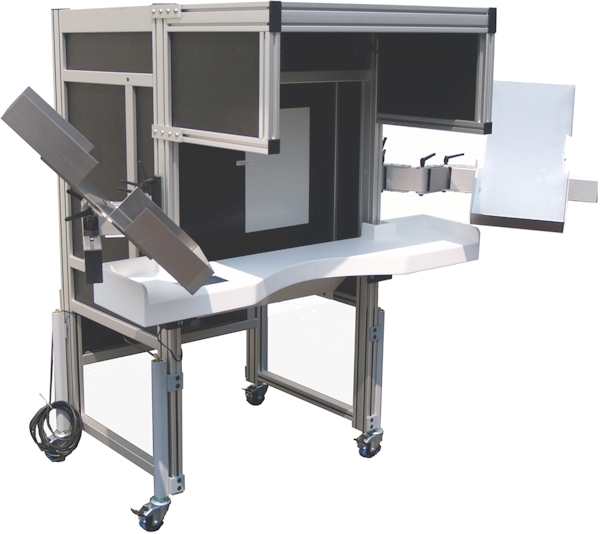
Figure 1. MIB-100 (Shown with Standard curved
front Corian® armrest,
Optional Stainless Steel Side Shelves, Hydraulic Leg Lifts and Top Shroud Configuration)
The Production Configurations MIB-100 is designed to
handle higher inspection volumes and is customized to meet the material handling
used in your facility. The stainless steel side shelves are designed to
customer requirements to fit production product trays. They provide
adjustments for 2 axis of rotation and 3 linear translations to make the shelf's
position "just right" for each individual inspector. Best of all, the
adjustments do not require any tools! The locking screws have ratcheting
handles that allow the inspection crew to make their own adjustments for optimum
comfort. The side shelves are offered in two configurations, adjustable as
shown in Figure 1 or fixed as shown in Figure 2 below.
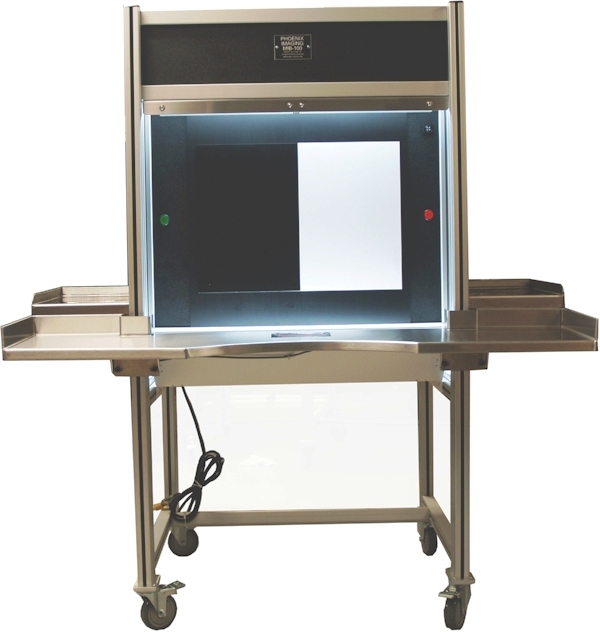
Figure 2. MIB-100D (Configuration with Stainless
Steel Armrest and fixed position side shelves)
The "D" option provides the ability to adjust light intensity from the operator
interface and the
"L" option provides the light curtains to initiate Pacer operations. This
model also includes the
larger LED Pacer lights and Audible Alarm.
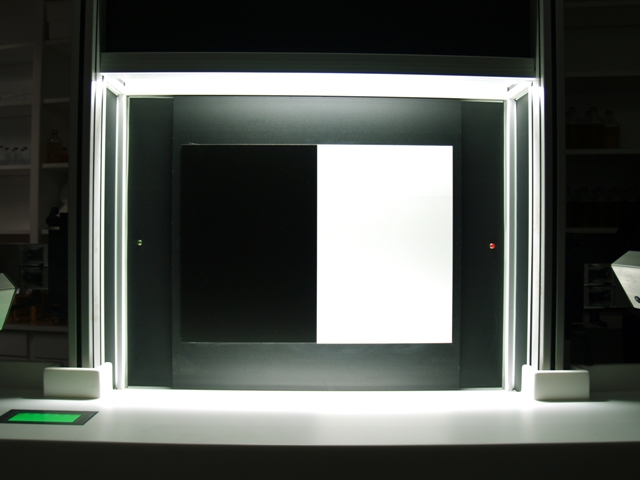
Figure 3. MIB-100 Lighting Uniformity in Inspection Volume
Lighting Profile of MIB-100 Manual Inspection Booth
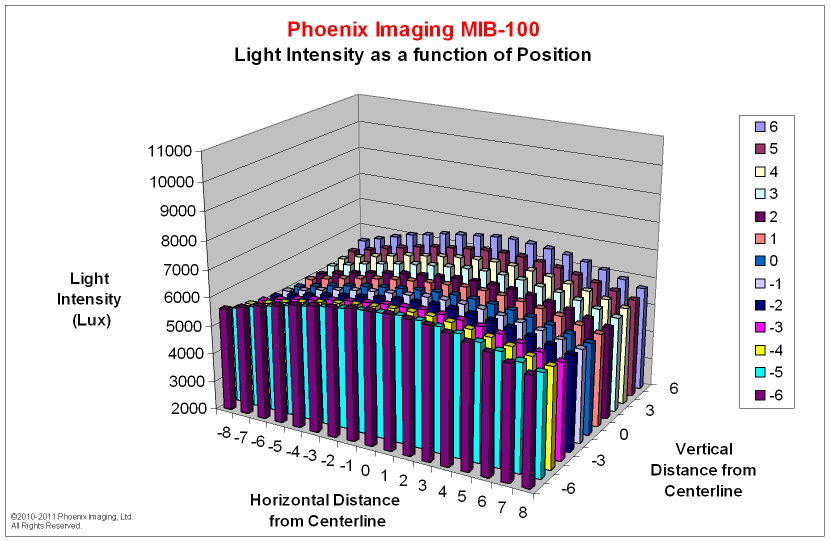
Figure 4. Light Intensity Map of MIB-100
Consistent inspection results require consistent light
intensity within the inspection volume. The MIB-100 provides the most
uniform light intensity within an inspection volume available in a commercial
product. The lighting technique is so unique that it is patented!
Most lighting booths offer a single light source that is usually mounted above
the inspection volume. This top lighting technique produces a non-uniform
inspection volume that can have light intensity variations of more than 200%
over a very short distance (i.e. <50 mm). The probability of detection is
directly related to the amount of light in the inspection volume. Top
lighting technology makes it very difficult for inspection teams to achieve
consistent inspection results. The MIB series of manual inspection booths
have a relatively "flat" inspection volume with constant light intensity values.
The plot in Figure 4 above is representative of the lighting map found in the
MIB-100 product.
Inspection Sequence and Duration
All MIB-100 models include a programmable logic controller integrated into the
system to pace the operator inspection time. The PLC / operator interface
insures that samples are inspected for a designed amount of time and that the
result of the inspection disposition is correctly recorded. This is done using a
small flat panel display mounted just below eye level on the left side of the
booth (or flush mount on the Solid Surface armrest/shelf as
in the standard configuration) and within the sight of the inspector.
The backlight color on the operator
interface panel will indicate the mode of operation. The color is green when the
system is in a "Setup" mode; this mode allows the supervisor to review
results, set inspection parameters and the inspector to enter the
"Inspection" mode and to review results when the inspection shift
ends. The screen color is orange at the beginning of the
light background
particle inspection. During the actual inspection period the
screen will display a graphic count down timer and a red LED light will appear
just to the right of the inspection area. When the LED turns off the
inspection period is complete and the screen will then be illuminated with a red
background. The red background indicates that the dark background
inspection is about to begin. When the dark background inspection is
active a green LED just to the left of the dark background inspection area is
illuminated. When the Green LED turns off the dark background is complete
and the operator interface background turns green and requests the inspection
result to be entered. The inspector must then select, Re-inspect,
Good
or Bad to return to the
Light Background inspection screen.
The inspection system may also be setup for 18% Gray Card
Inspection. The gray background inspection screen will be illuminated with
an orange background. Once the "Start Gray Test" button is depressed the
screen turns red and both LED in the the inspection area are illuminated during
the inspection period. When the allotted inspection time has expired the
LED's turn off and the screen turns green. The inspector must then select, Re-inspect,
Good
or Bad to return to the Gray
Background Inspection screen.
The inspection results may viewed by depressing the
"Results" button on the Main screen. The system will reconcile up to
65,535 inspected containers.
US Patent No. 5,940176 granted and others patents pending.
To Download the current brochure in PDF format click on
the link below.
MIB-100 Brochure
|