|
Products
and
Solutions
for:




| |
VisionMaker™ the key to PVS-100 development
 Visual
programming environment reduces development time Visual
programming environment reduces development time
The Phoenix Imaging’s VisionMaker™
Development Package provides all of the software necessary to
generate and implement a wide variety of machine vision applications. The
VisionMaker™ software can be used with
Windows™ 7 Pro operating systems. The VisionMaker™ Development Package is comprised of two major
components, VisionMaker™ ToolBox.
The VisionMaker™ ToolBox provides high level programming access using
Active-X Controls. The ToolBox can be used with Microsoft Visual Studio for drag and drop on the form programming.
The VisionMaker™ Tool Box VIEW.OCX and PITOOLS.OCX are custom controls for VisualBasic,
VisualC++ and C#. They provide an extension to the Visual Basic ToolBox or the Visual
C++ Application Studio Control Palette. The custom controls are added to the palette
with the standard controls and may be used just as you would any other control. When
you add VisionMaker™ Tool Box custom controls to a program they are available as part
of the development environment. The combination of VisionMaker™ Integrator and
VisionMaker™ Tool Box provide the user with an extremely powerful machine vision
development system with the ease of use normally associated with Microsoft Visual
Development Studios.
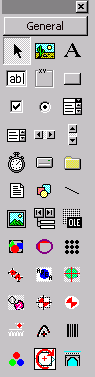
When you add VisionMaker™ Tool Box custom controls to a project the icons appear
in the Visual Basic toolbox or the VC++ App Studio Control Palette. The Visual Basic
toolbar appears as illustrated after adding the Pitools OLE Custom Control module and the
View OLE Custom Control module.
New tools are easily added to environment
A Total of 13 tools have been added to the standard Visual
Studio toolbar. The tools added to the Visual
Studio
toolbar (from left to right and top to bottom) include: calibration tool, multiple
normalized correlation tool, area tool, centroid tool, blob tool, golden template match
tool, grayscale normalized correlation tool, ruler tool, barcode tool, bridge tool, color
inspection tool, viewport tool, arc fitting tool and chord tool. This arrangement
may change slightly depending on the order in which the Active-X custom controls are added.
Additional tools may be added for special applications such as the color inspection
and color template matching tools. The toolbar will only appear during the
development phase of the project. During the development phase the user may access
any of the tools properties for calculation. After the application has been designed
and tested, it is normally built (compiled and linked) into an executable format for
implementation. In the executable form the application can not have tools added or
removed. However, tools that are present in the application can be repositioned and
changed in size as required. Even the vision algorithms associated with a tool can
be changed during run-time deployment. The vision algorithm associated with each of
the tools can be changed to meet the specific requirements of a particular application,
even after implementation in the field!
The Phoenix Imaging VisionMaker™ Tool Box also provides methods by
which the application developer can add their own functionality. The
VisionMaker™ Tool Box provides access to the base class allowing the developer to
customize copies of the existing tools or create entirely new tools. Since the
VisionMaker™ Integrator provides access to the image processing and I/O libraries
through .DLL’s the user can even incorporate the vision and I/o editors in their
tools. The flexibility of the VisionMaker™ package is unsurpassed. You
can configure applications to use as many vision editors as required, the number is only
limited by the amount of memory available.
Special Features:
- Easy to use ActiveX (32 bit) tools
- Can be used in MS VisualBasic or MS Visual C++ environments
- Over 150 image processing functions (most operates in hardware)
- 13 tools can be combined to provide solutions to a wide range of machine vision
applications
- Pre-defined run-time "properties" panels are provided for all tools
- Each tool allows the user the option to generate their own image processing algorithm or
to use the default vision algorithm
For a description of the ToolBox components click here.
To see an example of a tool, its property panels and
functionality click here.
|